Old photographs are windows into the past. They remind us of childhood adventures, family celebrations, wedding ceremonies, and special moments with people we love. Whether you have a vintage family portrait, an old school photograph, or a picture of your grandparents, every image holds a story worth preserving.
But photographs capture only a single moment. What if you could make those memories feel more alive? With modern artificial intelligence, you can now animate old photos with AI and transform still pictures into short animated videos featuring natural-looking movements and expressions.
AI photo animation offers a creative way to revisit forgotten memories, celebrate family history, and share meaningful moments with future generations. With Animate Memories, you can explore how technology makes traditional photographs more engaging.
What Does It Mean to Animate Old Photos with AI?
AI photo animation uses artificial intelligence to add movement to static photographs. The technology analyzes facial features, image positioning, and other visual details to generate animated effects.
For example, an old portrait can be transformed into a short video featuring blinking eyes, a gentle smile, or subtle head movements. These effects create the appearance of motion while retaining the original photograph as the foundation.
Unlike traditional animation, which often requires advanced editing skills and considerable time, AI-powered tools automate much of the process.
However, AI-generated movements are interpretations rather than actual recordings of how someone moved. This distinction is especially important when animating historical photographs or pictures of loved ones who have passed away.
Why Should You Animate Old Family Photos?
Family photographs have emotional value because they connect us with our personal history. Animating selected pictures creates another way to appreciate and share those memories.
1. Rediscover Childhood Memories
Childhood photographs remind us of school days, birthday celebrations, family vacations, and unforgettable experiences.
You can transform an old childhood portrait into a short animated clip and revisit familiar moments from a fresh perspective. These animations can also become fun additions to personal memory collections.
2. Reconnect with Previous Generations
Photographs of grandparents and great-grandparents help preserve family history. They allow younger relatives to discover the people, traditions, and experiences that shaped their family.
Animating selected ancestral portraits can make digital family albums more engaging and encourage conversations between generations.
3. Create Personalized Gifts
An animated photograph can become a thoughtful gift for birthdays, anniversaries, and family celebrations.
For example, you can use an old wedding portrait to create a personalized anniversary video for your parents. Adding meaningful captions and music can make the final creation even more special.
4. Celebrate Memories of Loved Ones
Photographs of loved ones preserve important memories and relationships. AI photo animation offers a creative way to revisit these treasured images.
Families may use animated portraits in private remembrance videos or tribute projects. Always approach these creations sensitively and consider the preferences of other family members.
How to Animate Old Photos with AI Using Animate Memories
You do not need professional photography or video editing experience to explore AI photo animation. Modern tools make the process accessible to beginners.
Follow these simple steps to get started.
Step 1: Choose Your Favorite Photograph
Select an old photograph that holds special meaning. It could be a childhood picture, a vintage family portrait, an old wedding photograph, or an image of your grandparents.
Choose an image where the face is reasonably clear and visible.
Step 2: Visit Animate Memories
Open the Animate Memories website and explore its available photo animation features.
Select the appropriate option to begin creating your animated memory.
Step 3: Upload Your Old Photo
Choose the photograph from your device and upload it according to the platform’s instructions.
A clear, high-quality image with visible facial features can help AI technology analyze the photograph more effectively.
Step 4: Generate Your Animation
Follow the available generation process. The AI system analyzes your uploaded photograph and creates movements based on the image.
Depending on the available features and photograph quality, the animation may include subtle facial expressions and movements.
Step 5: Preview and Save Your Creation
Once the animation is ready, preview the result. If you are satisfied, use the available download or sharing options to save your animated memory.
You can also include the clip in a family video or digital photo collection.
What Types of Old Photos Can You Animate?
One of the exciting aspects of AI photo animation is its versatility. You can experiment with different types of photographs to create meaningful digital memories.
Vintage Family Portraits
Vintage portraits capture the clothing, appearance, and traditions of earlier generations. Animating these photographs provides a creative way to explore family history.
Grandparents’ Photographs
Photographs of grandparents are often among the most treasured family possessions. Animated portraits can become meaningful additions to family memory collections.
Old Wedding Photographs
Wedding pictures preserve important milestones and beautiful memories. Adding subtle movement to an old wedding portrait can create a memorable anniversary video or digital keepsake.
Childhood Pictures
Old school photographs, birthday portraits, and childhood vacation pictures are excellent choices for personal memory projects.
Historical and Ancestral Photographs
People interested in genealogy can use animated ancestral portraits as creative additions to family history presentations and digital archives.
Tips for Getting Better AI Photo Animation Results
The quality of your original photograph can influence the final animation. Before uploading your image, consider these practical suggestions:
- Choose clear photographs: Images with visible facial features generally produce better results.
- Use front-facing portraits: Faces looking toward the camera are often easier for AI models to analyze.
- Restore damaged photographs: Consider repairing heavily scratched or faded pictures before animation.
- Avoid extremely blurry images: Blurred facial details may affect the quality of generated movements.
- Use high-resolution pictures: Better image quality can help preserve important facial details.
- Respect personal privacy: Obtain appropriate permission before animating or publicly sharing photographs of other people.
Remember that AI-generated movements may not perfectly represent someone’s real expressions or behavior.
AI Photo Animation vs. Traditional Photo Restoration
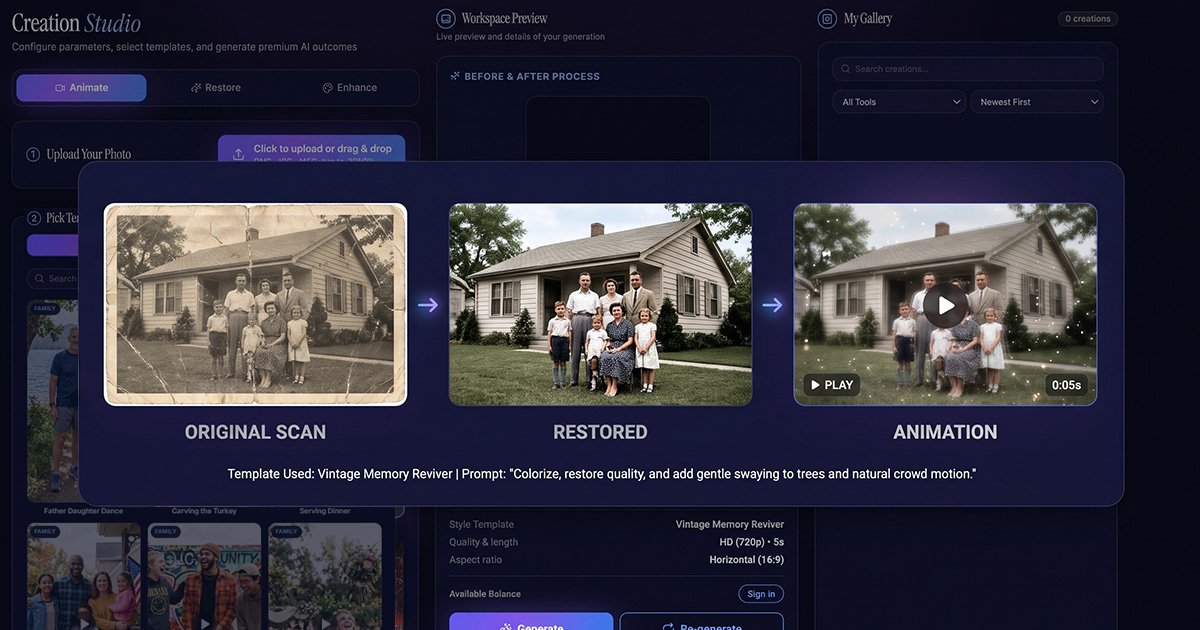
Photo restoration and AI photo animation serve different purposes, but they can work together to preserve old photographs.
Photo restoration focuses on improving image quality by repairing scratches, reducing damage, and correcting faded colors. AI photo animation focuses on introducing movement into static pictures.
| Feature | Photo Restoration | AI Photo Animation |
|---|---|---|
| Improve image quality | Yes | Not its main purpose |
| Repair scratches | Yes, with suitable tools | No |
| Correct faded colors | Yes, with suitable tools | No |
| Add facial movements | No | Yes |
| Create animated videos | No | Yes |
For photographs with significant damage, restoring the image before animation may help create a more visually appealing result.
Creative Ways to Use Animated Old Photos
After creating an animated photograph, you can use it in several creative ways.
1. Create Family Memory Videos: Combine animated portraits, original photographs, captions, and music to tell your family’s story.
2. Surprise Your Parents: Transform an old childhood or wedding photograph into a personalized birthday or anniversary gift.
3. Celebrate Family Milestones: Include animated photographs in family reunions, anniversaries, and special celebrations.
4. Build Digital Photo Albums: Add animated clips alongside original photographs to create a more engaging digital collection.
5. Share Memories on Social Media: Share selected animations with friends and relatives while respecting everyone’s privacy preferences.
6. Preserve Family History: Include animated ancestral portraits in genealogy presentations and digital storytelling projects.
Why Choose Animate Memories?
Preserving special memories should be simple, enjoyable, and meaningful. Animate Memories focuses on AI-powered photo animation, helping people discover creative ways to experience their favorite photographs.
Whether you have one childhood portrait or an entire collection of vintage family pictures, you can explore the possibilities of transforming still images into moving digital creations.
You do not need advanced editing knowledge to get started. With a suitable photograph and an easy-to-follow process, you can create something meaningful from the pictures you already treasure.
The goal is not to replace original photographs but to give them another way to be experienced, appreciated, and shared.
Conclusion
Every old photograph carries a special story. Some remind us of childhood adventures, others capture family celebrations, and many preserve memories of people who have played important roles in our lives.
With artificial intelligence, you can animate old photos with AI and experience familiar memories in a creative new way. From vintage family portraits to childhood pictures and wedding photographs, AI photo animation offers exciting possibilities for celebrating the past.
Ready to rediscover your favorite photographs? Visit Animate Memories and explore how AI-powered photo animation can help turn your treasured pictures into moving digital memories.
SEO Keywords
Primary Keyword: Animate Old Photos with AI
Secondary Keywords: Animate Old Photos, AI Photo Animation, Animate Old Pictures, Old Photo Animation, Bring Old Photos to Life, Animate Family Photos, AI Photo Animator, Animate Vintage Photos, Animate Childhood Photos, Animate Grandparents Photos, Turn Old Photos into Videos, Photo to Video AI, Moving Old Pictures, Bring Family Memories to Life, Animate Historical Photos, Old Family Photo Animation
Suggested URL Slug: animate-old-photos-with-ai
Suggested H1: Animate Old Photos with AI and Bring Memories to Life